Developer Preview · Not production-ready. Expect breaking changes between releases.
Unified cloud and DevOps workbench
Cloud work without the context switching.
Use one workspace to inspect cloud resources, run local emulators, and apply IaC recipes with OpenTofu (infrastructure as code). CloudSprocket is built for developers who need practical DevOps visibility without living across provider consoles, CLIs, and disconnected tools.
Developer Preview · Windows, macOS, Linux · AGPL-3.0 · v0.9.22
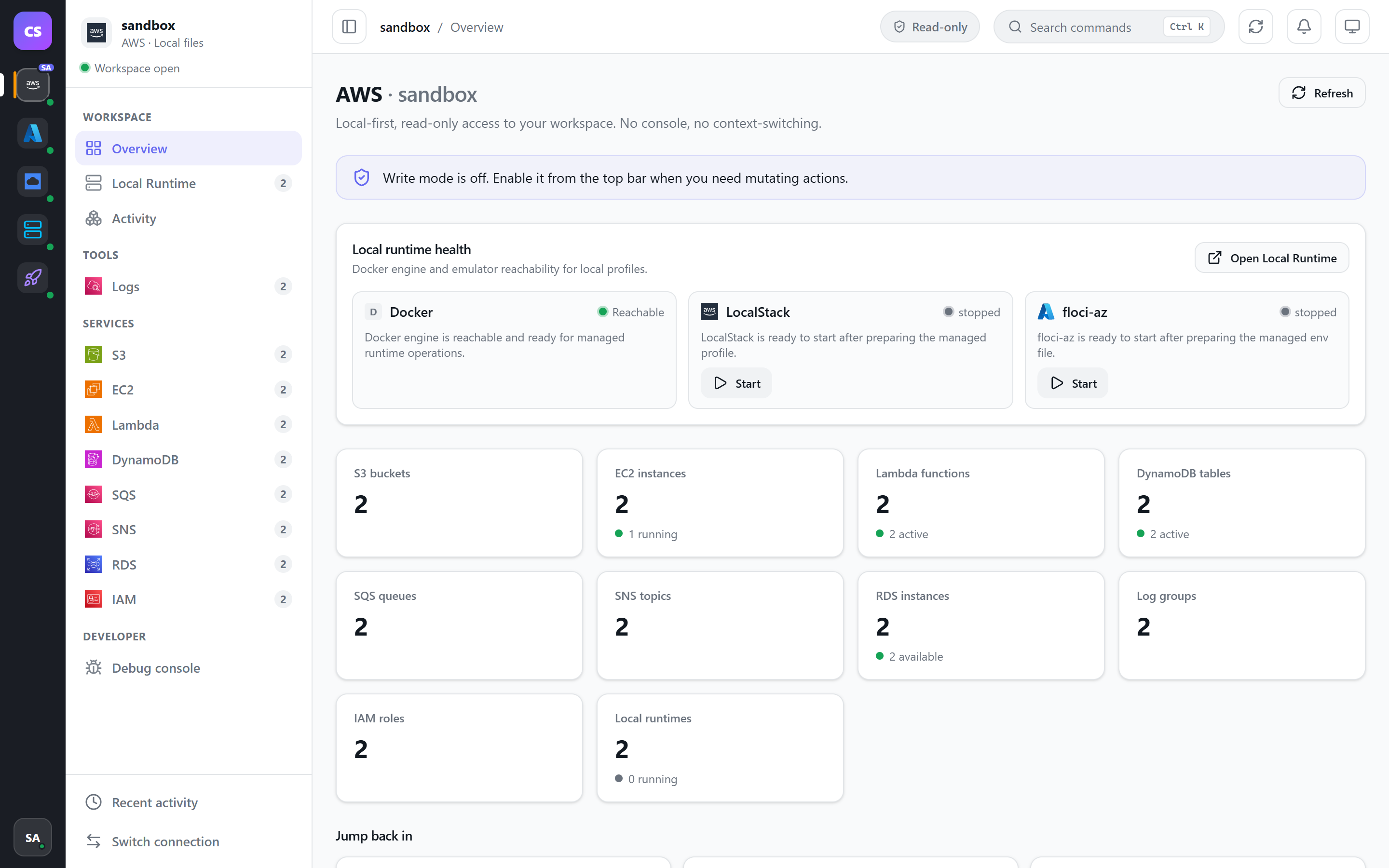
A unified view of cloud resources and local runtimes.
A practical workspace for developers learning cloud operations.
Experiment locally, then deploy through OpenTofu.
CloudSprocket running locally.
Features
One workspace for cloud, local, and IaC.
One view across your cloud estate
See supported cloud resources in one desktop shell instead of hopping between provider consoles. AWS, Azure, and Google Cloud are available today. Google Cloud covers Cloud Storage, Compute Engine, Cloud Functions, and GKE.
Local experimentation built in
Start compatible AWS and Azure emulator runtimes from the app, run recipes against them, and understand how infrastructure behaves before touching shared environments. Docker has to be running before a local emulator will start, and Google Cloud has no local emulator here.
IaC workflows close at hand
Plan and apply OpenTofu recipes for AWS, Azure, and the local emulators from the same workflow, with practical templates for common application patterns.
For developers, not just operators
Developers can inspect resources, try changes, and learn operational workflows without taking full DevOps ownership. No account required for local emulators: a cloud account is only needed for a live profile. There is no telemetry, and credentials stay local.
How it works
Install, open, choose.
01
Install
Install the desktop app for your platform.
02
Open
Open CloudSprocket.
03
Choose
Pick a profile the app already finds, or start a local emulator.
Under the hood
Runs locally by design.
No telemetry. No account required for local emulators: a cloud account is only needed for a live profile. Credentials are used locally and never sent to CloudSprocket.
Tauri v2, React, TypeScript, Tailwind
Go sidecar over JSON-RPC
OpenTofu deployment recipes
Docker-backed local runtime for compatible emulators
Licence: AGPL-3.0-or-later
Download
Get CloudSprocket.
Choose the installer for your platform. Local emulator containers are downloaded only when you start them.
Install the desktop app for your platform.
Open CloudSprocket.
Pick a profile the app already finds, or start a local emulator.
Developer Preview. CloudSprocket is in Developer Preview. Behaviour, workspace data formats, and APIs may change between releases. Use local emulators and non-critical accounts until v1.0.
No. CloudSprocket is in Developer Preview. It is not production-ready: behaviour, data formats, and APIs may change between releases. Use local emulators and non-critical accounts while evaluating the app.
Is it really free?
Yes. CloudSprocket is free and open source under AGPL-3.0-or-later. Download it, use it, and inspect the source on GitHub.
Do my cloud credentials leave my machine?
No. Credentials are used locally and never sent to CloudSprocket. There is no telemetry.
Which clouds are supported?
AWS, Azure, and Google Cloud are supported today. Google Cloud covers Cloud Storage, Compute Engine, Cloud Functions, and GKE. Deeper Google Cloud coverage is still on the roadmap. The goal is a unified cloud workbench, not a single-provider console replacement.
Are LocalStack or floci-az included in the download?
No. The installer contains only the desktop app. When you start a local emulator, CloudSprocket pulls and runs the relevant container images on your machine. It orchestrates those runtimes; it does not ship, fork, or redistribute LocalStack or floci-az.
Do I need Docker?
Docker has to be running before a local emulator will start. Google Cloud has no local emulator here.
Is CloudSprocket affiliated with AWS, Microsoft, Google, or LocalStack?
No. CloudSprocket is an independent open-source project. It is not affiliated with, endorsed by, or sponsored by Amazon, Microsoft, Google, LocalStack, or the OpenTofu project. All product names and trademarks are the property of their respective owners.
These are separate practice environments. They run on your machine or in the browser, so you can fix broken Linux servers, practise Ansible or learn Docker.